How to root CM Flare S3 Power Lollipop and Install Custom Recovery

Preparations:
============================
Download all:
USB driver Driver_Auto_Installer or
PdaNet+ v4.18
SP_Flash_Tool_v5.1516.00
Carliv_Root
Stock Recovery
BETA-SuperSU-v2.52.zip
UPDATE:
TWRP (rename into recovery.img)
WARNING: Do NOT Connect Phone to PC
Turn Off Antivirus Protection Temporarily
=================================
Installation Instructions:
=================================
A. Driver_Auto_Installer
1. Extract Driver_Auto_Installer
2. Right Click Install.bat and Run as Administrator
3. upon installation,there will be a prompt. click Install right away
DONE!!!
B. PdaNet+
1. Right Click PdaNetA4180.zip and Click Extract All.... then Click Extract button
-Now you have PdaNetA4180 Folder
2. Open PdaNetA4180 Folder
3. Right Click PdaNetA4180.exe and Run as Administrator
4. Click Next button and Accept License Agreement
5. USB driver found will pop-up Click Yes
6. Phone Selecton will pop-up Click Others(or if you are not sure) then Click OK
7. USB Driver Installation will pop-up Click Skip USB
8. There will be 2 Pop-ups Click X Mark for each Pop-up
9. From the Botom Right Corner you will See an Icon of PdaNet+ saying Not Connected with Red X Mark
DONE!!!
C. SP Flash Tools
1. Transfer SP_Flash_Tool_v5.1516.00.rar to C: Drive
2. Right Click SP_Flash_Tool_v5.1516.00.rar and Click Extract All.... then Click Extract button
Now you have SP_Flash_Tool_v5.1516.00.rar Folder inside C: Drive
INSTALLING MTK DRIVERS FOR WINDOWS 8/8.1/10/ 32bit/64bit
1. Firstly Download MTK USB VCOM Drivers for you device model from the below link.
2. Now open Device Manager in your PC by right clicking on My Computer and then click on Manage.
3. Next go to Device Manager in that and click on your PC name and then click on Add legacy hardware
4. Now in Add Hardware Wizard click on Next >> Install the Hardware that i manually select from a list (Advanced) >> Show All Devices >> Next >>Have a Disk >> Browse, Now select the any inf file from where you extracted the downloaded drivers.
5. Now click on Next on the wizard to install the drivers and when promoted for security issue just click on install any anyway to finish the driver installation.
6. That’s it after clicking on Finish Restart your PC and use your tool with VCOM Drivers.
DONE!!!
FLASHING THE RECOVERY1. Click Scatter Loading
2. Gamitin lang ang "MT6592_Android_scatter.txt" kasama sa rar
3. Siguraduhin na walang check lahat maliban sa recovery
Follow this like in image below...

4. Double Click nyo yung recovery ibrowse yung recovery.img na galing sa rar
5. Press Download button (wag muna isasaksak sa PC)
6. Plug nyo na sa PC ang Phone
Note:*press and hold power button, after 3 secs press naman volume down(basta lumabas na yung logo press agad volume down) para makapunta sa ctrecovery at dun iflash ang BETA-SuperSU-v2.52.zip
ulitin ang pagflash sa recovery pag sa 1st boot di nakapunta sa ctrecovery
kung magfactory reset kau, flash nyo muna stock recovery(mawawala kasi imei nyo pag nagfactory reset sa ctr)
7. Important: Disconnect your phone from the computer, press and hold Vol Up + Power.
8. Boot menu will show, select Recovery.
From the custom recovery (CWM), it is recommended to backup your phone first, before rooting.
To root:
1. Reboot your phone then press and hold Vol Up + Power On
the CWM Recovery , click Install zip.
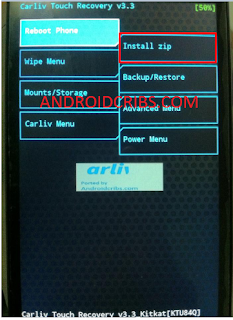
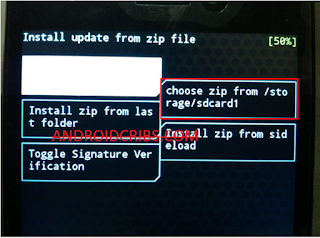

2. Choose zip from storage/sdcard1

3. Select BETA-SuperSU-v2.52.zip.
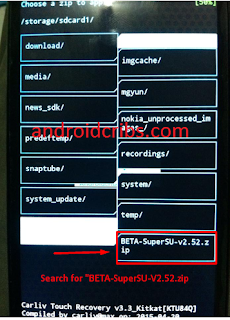 4. Tap Yes Install BETA-SuperSU-v2.52.zip.
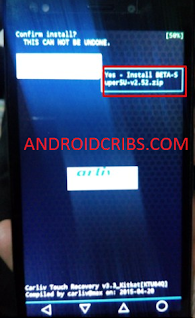


5. Flash it, no need to wipe cache. Wait to finish. Once completed then reboot!
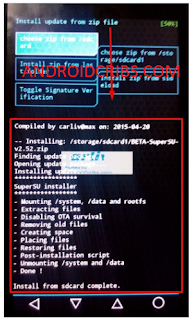

4. Enjoy your rooted CM FLARE S3 Power
Then download Root checker in Playstore to verified.
Credits to
@Nick Fury
@June Jimenia
@Rafael Santiago
CM Flare S3 Power Community


![[ROM] CleanKat v4.1 for CM FLARE S3 POWER Preview 1](https://blogger.googleusercontent.com/img/b/R29vZ2xl/AVvXsEg43y6aqCfXpYqvj9XbseNd1ePSVY_FrhWACmNF82aujv8h39uoPogLNJib4I_fnvKg4q-QvCDKw-qBT8VSKpTWzxIitS3vMs4__BMehpBuZybunbRpwMvQPWoAr2CSnEsqDax0fRZKm8I/s1600/cleankat2.jpg "[ROM] CleanKat v4.1 for CM FLARE S3 POWER")
![[ROM] CleanKat v4.1 for CM FLARE S3 POWER Preview 2](https://blogger.googleusercontent.com/img/b/R29vZ2xl/AVvXsEi3P9H8ObVYIONOSD7O7VdoHeLanQei7e8SVgKODogvb2nEl32UrwL5boIImB0aIhe0b89wotdoMXThZUUa9Y9WVIuU3DczAvv22J_aTOEAan3b_OMpiGI9-_WOL0z91jRqoyVsaYVdFxM/s1600/cleankats3.jpg "[ROM] CleanKat v4.1 for CM FLARE S3 POWER")
![[ROM] HydrogenOS for CM FLARE S3 POWER Preview 1](https://blogger.googleusercontent.com/img/b/R29vZ2xl/AVvXsEiXUKaRF7-ncNQ7dxo-gMyBwwNgoI5hUTZ3q_Oe4h_S6rulpsjjreBULFbVYi6P0LUmIVKkMg-25jYJp9EVuTas-kRvGbNFrTMDgtLWKmzKgTPD48AiV2znIDY-HNE6vVSt078fxbymXeg/s1600/hydrogenOS.1.jpg "[ROM] HydrogenOS for CM FLARE S3 POWER")
![[ROM] HydrogenOS for CM FLARE S3 POWER Preview 2](https://blogger.googleusercontent.com/img/b/R29vZ2xl/AVvXsEh8kqijaBsyXkfwt4VIaydcgGQl4n26s0P9u2_YHkIeToBXDSQm6TCOwf20AXpi95SYI9IMCrZKyOJeWltOjQDj-bbV2MpGYpoghNA5Qrfov1fIDrsUv2rEBZkXCK4yYDiZ8ZjwAqJH_PQ/s1600/hydrogenOS.2.jpg "[ROM] HydrogenOS for CM FLARE S3 POWER")
![[ROM] HydrogenOS for CM FLARE S3 POWER Preview 3](https://blogger.googleusercontent.com/img/b/R29vZ2xl/AVvXsEhqY4wTUuBS1uZ6AwRzc-L3k5n37down0nSqXSYJ5FHFmtpWdiuMJ71JA6HjwfAz3uhhKlWcHoqR9aDZ4SQhV0-JRvBar0G9gCXoCnRhhxXDSIZbfiDH-pqppP7C7MJWrLfYMcoPo8gn_Q/s1600/hydrogenoS.3.jpg "[ROM] HydrogenOS for CM FLARE S3 POWER")
![[ROM] HydrogenOS for CM FLARE S3 POWER Preview 4](https://blogger.googleusercontent.com/img/b/R29vZ2xl/AVvXsEh7VR9qStssPTiyCKF9RPRc2BjvEQS-mdBoa-t756hdcj5hf8g2JjpD5BTdQtCdovftFx67HHthHCxBgNw9XsZzExLABxSXcM4-OpYO0IGjbR0q5eyKZwrqv48M0AGa_t4USAUDwIGgN9k/s1600/hydrogenOS.4.jpg "[ROM] HydrogenOS for CM FLARE S3 POWER")


