Showing posts with label Lenovo a7000. Show all posts

Thursday, December 3, 2015

How to root and Flash TWRP in Lenovo a7000

How to root and Flash TWRP in Lenovo a7000 


Root and Install TWRP in Lenovo A7000 plus


Warning: Rooting can void your warranty! Do it at your own risk!

Requirements:
Download all and extract:
LenovoUsbDriver_1.0.14.rar
SP_Flash_Tool_v5.1516.00.rar
TWRP_2.8.6.0.rar
UPDATE-SuperSU-v2.46.zip


Installing CWM/TWRP recovery in Lenovo A7000 via SPFT

Procedure:
  1. Make sure you have enough Battery atleast 60% and above.
  2. Download and extract LenovoUsbDriver_1.0.14.rar then install AIO_LenovoUsbDriver_autorun_1.0.14.exe in PC
  3. Download and extract SP_Flash_Tool_v5.1516.00.rar and open folder then click flash_tool.exe
SPFT Setup 1


 4. Click Scatter-loading and browse for the scatter file included in the  (TWRP_2.8.6.0.rar or K3_Note_TWRP_2.8.7.0.rar) you can choose any of this two recovery then click  (MT6752_Android_scatter)
.5.  Make sure flashing mode is set to "Download Only" and check mark only on the Recovery.

SPFT Setup 2

6. Click the Download button
7. Plug and connect Lenovo A7000  to PC /computer via USB cable without unplugging battery and without pressing any button.
8. Wait some time to receive notification Download OK and green check icon
9. Done, please unplug the Lenovo A7000 of PC / computer and into TWRP Recovery by pressing and holding all buttons (volume up + power button + volume down) until the  TWRP appear. done!


ROOT way through TWRP

To root:


  1.  Download UPDATE-SuperSU-v2.46.zip and move in your sdcard.
  2.  Reboot your  phone then press and hold Vol Up + Power On the TWRP Recovery , click Install.
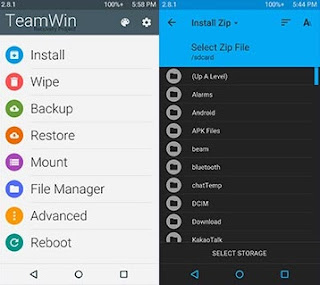
  3. TWRP SUCCESS INSTALLING IN LENOVO A7000
  4.  Select UPDATE-SuperSU-v2.46.zip.
  5.  Flash it, no need to wipe cache, you can reboot as it is.
  6.  Enjoy your rooted Lenovo A7000 .

Then download Root checker in Playstore to verified. Enjoy!

Note: Do not update via OTA. Please unroot first.


Credits:
4pda.ru
svyato15

[TUT] How to fix Bootloop/Deadboot of Lenovo A7000

[TUT] How to fix Bootloop/Deadboot of Lenovo A7000

How to fix Bootloop in Lenovo A7000


Requirements:
Download all and extract:
LenovoUsbDriver_1.0.14.rar
SP_Flash_Tool_v5.1516.00.rar
LENOVO A7000 FIRMWARE

1. Make sure you have enough Battery atleast 60% and above.
2. Download and extract LenovoUsbDriver_1.0.14.rar then install AIO_LenovoUsbDriver_autorun_1.0.14.exe in PC
3. Download and extract SP_Flash_Tool_v5.1516.00.rar and open folder then click flash_tool.exe
SPFT Setup 1
4. Run Flash_tool.exe, press the button Scatter-loading MT6752_Android_scatter.txt and select the folder with the firmware.
5. Be sure to put a check DA DL All With Check Sum in the menu Options-Options-Download.
6. Arrange the Firmware-Upgrade instead of the Download Only.
7. Push the button Download. 
8. Connect the phone while in off. 
9. If everything is correct, the "runners" color bars  and the status of the green circle appear in  a couple of minutes, to indicate the success of the operation.
10. Enjoy!.
Credits:
4pda.ru
mischa90542
svyato15

Thursday, November 12, 2015

How to root and Flash TWRP in Lenovo a7000 plus/K3 note

How to root and Flash TWRP in Lenovo a7000 plus/K3 note

In this tutorial I will teach you on how to root Lenovo a7000plus and K3 Note via SPFT tools.
Also on how to flash TWRP recovery.  
To do this you need Desktop or Laptop and working USB cord to connect in your phone.
Just download all the requirements and follow my instructions carefully. 


Lenovo A7000 plus root and TWRP


Warning: Rooting can void your warranty! Do it at your own risk!

Requirements:
Download all and extract:
LenovoUsbDriver_1.0.14.rar
SP_Flash_Tool_v5.1516.00.rar
TWRP_2.8.7.0.rar for K3 Note
TWRP 2.8.7.0 for Lenovo A7000 plus
UPDATE-SuperSU-v2.46.zip


Installing CWM/TWRP recovery in Lenovo A7000 via SPFT

Procedure:
  1. Make sure you have enough Battery atleast 60% and above.
  2. Download and extract LenovoUsbDriver_1.0.14.rar then install AIO_LenovoUsbDriver_autorun_1.0.14.exe in PC
  3. Download and extract SP_Flash_Tool_v5.1516.00.rar and open folder then click flash_tool.exe
SPFT Setup 1


 4. Click Scatter-loading and browse for the scatter file included in the  (TWRP_2.8.7.0.rar for K3 Note) and (TWRP 2.8.7.0 for Lenovo A7000 plus) then click  (MT6752_Android_scatter)
.5.  Make sure flashing mode is set to "Download Only" and check mark only on the Recovery.

SPFT Setup 2

6. Click the Download button
7. Plug and connect Lenovo A7000 Plus to PC /computer via USB cable without unplugging battery and without pressing any button.
8. Wait some time to receive notification Download OK and green check icon
9. Done, please unplug the Lenovo A7000 plus of PC / computer and into TWRP Recovery by pressing and holding all buttons (volume up + power button + volume down) until the  TWRP appear. done!


ROOT way through TWRP

To root:


  1.  Download UPDATE-SuperSU-v2.46.zip and move in your sdcard.
  2.  Reboot your  phone then press and hold Vol Up + Power On the TWRP Recovery , click Install.
  3. TWRP SUCCESS INSTALLING IN LENOVO A7000
  4.  Select UPDATE-SuperSU-v2.46.zip.
  5.  Flash it, no need to wipe cache, you can reboot as it is.
  6.  Enjoy your rooted Lenovo A7000 plus.

Then download Root checker in Playstore to verified. Enjoy!


You can watch the tutorial in Youtube
Credits: Nigel Esteves

Note: Do not update via OTA. Please unroot first.

Friday, November 6, 2015

[TUT] How to Root and Flash Custom Recovery to Lenovo A7000

[TUT] How to Root and Flash Custom Recovery to Lenovo A7000

Lenovo A7000 Rooting and TWRP


Warning: Rooting can void your warranty! Do it at your own risk!

Requirements:
Download all and extract:
LenovoUsbDriver_1.0.14.rar
SP_Flash_Tool_v5.1516.00.rar
TWRP_2.8.6.0.rar
CWM_Recovery_1_&_2.rar
UPDATE-SuperSU-v2.46.zip


Installing CWM/TWRP recovery in Lenovo A7000 via SPFT

Procedure:
  1. Make sure you have enough Battery atleast 60% and above.
  2. Download and extract LenovoUsbDriver_1.0.14.rar then install AIO_LenovoUsbDriver_autorun_1.0.14.exe in PC
  3. Download and extract SP_Flash_Tool_v5.1516.00.rar and open folder then click flash_tool.exe
Flash Tool SPFT


 4. Click Scatter-loading and browse for the scatter file included in the (CWM_Recovery_1_&_2.rar) or (TWRP_2.8.6.0.rar) you can choose any of this two recovery then click  (MT6752_Android_scatter)
.5.  Make sure flashing mode is set to "Download Only" and check mark only on the Recovery.

MT6572 SPFT LOCATE

6. Click the Download button
7. Plug and connect Lenovo A7000 to PC /computer via USB cable without unplugging battery and without pressing any button.
8. Wait some time to receive notification Download OK and green check icon
9. Done, please unplug the Lenovo A7000 of PC / computer and into CWM Recovery by pressing and holding all buttons (volume up + power button + volume down) until the CWM or TWRP appears. done!


ROOT way through CWM/TWRP

To root:

  1.  Download UPDATE-SuperSU-v2.46.zip and move in your sdcard.
  2.  Reboot your  phone then press and hold Vol Up + Power On the CMW/TWRP Recovery , click Install.
  3.  Select UPDATE-SuperSU-v2.46.zip.
  4.  Flash it, no need to wipe cache, you can reboot as it is.
  5.  Enjoy your rooted Lenovo A7000.

Then download Root checker in Playstore to verified. Enjoy!

Note: Do not update via OTA. Please unroot first incase you want to go back in stock recovery just flash this stock recovery.