How to fix bootloop in Alcatel Flash 2 included Stock Rom flash via SPFT
This tutorial is able to help you oh how to fix bootloop and hardbrick in Alcatel Flash 2.
In case you don't have backup and installed custom recovery you can proceed in this procedure.

Requirements:
PC
USB Cable
Download Links:
Mediatek VCOM Drivers
AFP2 Stock rom(v2.9 lollipop)Mediatek VCOM Drivers
Instructions
1. Download all necessary files and Enable USB Debugging mode in your phone..
2. Install Drivers USB_VCOM_Driver.rar
In Device Manager Right click on PC name(Right Side) and then click on Add legacy hardware as shown in image below.
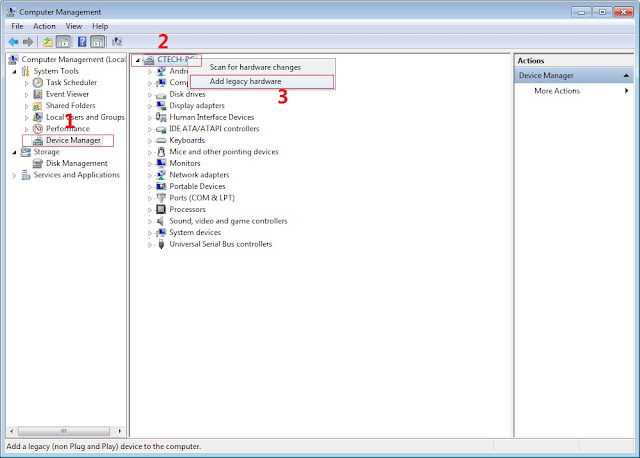
Now in Add Hardware Wizard click on Next » Install the Hardware that i manually select from a list (Advanced) » Show All Devices » Next » Have a Disk, Now select the any inf file from where you extracted the downloaded VCOM driver package.

3. Now Click on Next and select Install this driver software anyway and wait for finishing the process.

4. After installation is finished then Restart your computer, That's it.
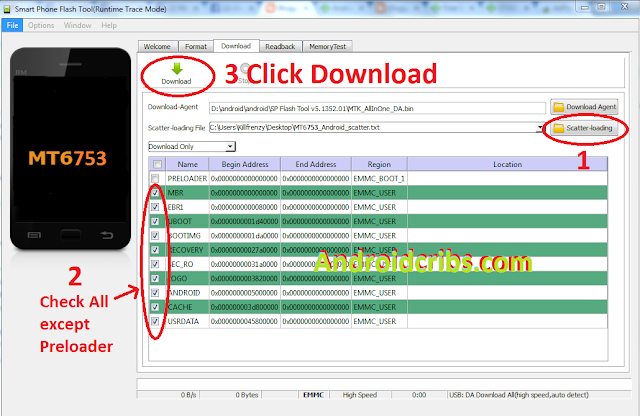
5. Open flash_tool.exe, click on the Download Tab
Extract the downloaded AFP2 stock rom to the new folder you created.

Extract the downloaded AFP2 stock rom to the new folder you created.

6. Click Scatter-loading and browse for the scatter file (MT6753_Android_scatter)
7. For Bootloop only
Make sure flashing mode is set to "Download Only" and check mark all except Preloader.
Note: If deadboot/hardbrick set "Download+Format" and check Preloader.
Make sure flashing mode is set to "Download Only" and check mark all except Preloader.
Note: If deadboot/hardbrick set "Download+Format" and check Preloader.
8. Click Download.

9. Turn off your phone, connect your phone to the PC and wait for the flashing to commence.
10. Green Circle image with check will show once flashing is completed. That's it!

Credits:
Long nt for rom
AFP2 Group

11. Disconnect your phone in USB cord then open if still bootloop then try to factory reset in recovery settings. To go in recovery mode reboot your phone hold and press power on and volume up simultaneously until recovery mode appeared.
Long nt for rom
AFP2 Group


![[TUT] How to fix bootloop Alcatel Flash Plus and Flash using SPFT Main Picture](https://blogger.googleusercontent.com/img/b/R29vZ2xl/AVvXsEiIL9VtlLRKVCOwSTDu3MWh-8quMBPszRjwytI9UT42lgxYTMENqloTM_OSNZ2GA1p8Ae2bzlchHwLXPUi3njtKNeIM90hJYd09p92K7RS9k3yRy8Qx_NJMwApF1IctNbl6IiyZ-LGVgSw/s1600/AlcatelFlashPlus.png "[TUT] How to fix bootloop Alcatel Flash Plus and Flash using SPFT")