Showing posts with label lenovo a5000. Show all posts

Thursday, November 5, 2015

Tutorial how to flash TWRP 2.8.7.0 For Lenovo A5000 in Lollipop version

Tutorial how to flash TWRP 2.8.7.0 For Lenovo A5000 in Lollipop version


Requirements:
PC
USB Cable


Download Links:
Mediatek VCOM Drivers:

SP Flash Tool:

Lenovo TWRP + Scatter file
Click Here


 Instructions
1. Download all necessary files and Enable USB Debugging mode in your phone..
2. Install Drivers USB_VCOM_Driver.rar
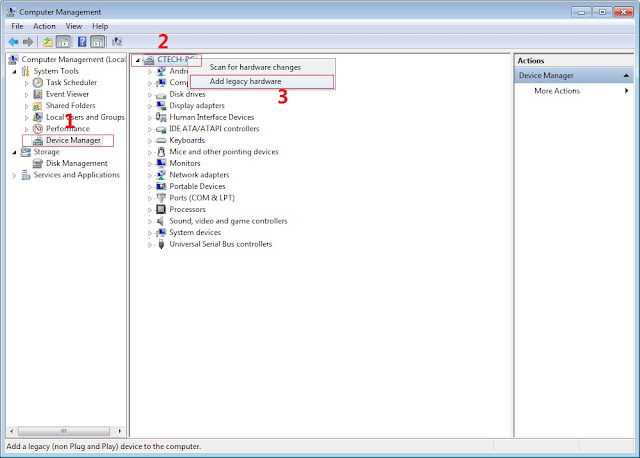
In Device Manager Right click on PC name(Right Side) and then click on Add legacy hardware as shown in image below.

Tutorial to flash
Now in Add Hardware Wizard click on Next » Install the Hardware that i manually select from a list (Advanced) » Show All Devices » Next » Have a Disk, Now select the any inf file from where you extracted the downloaded VCOM driver package.

tutorial how to flash

 Now Click on Next and select Install this driver software anyway and wait for finishing the process.

Tutorial to flash

    After installation is finished then Restart your computer, That's it.
3. Extract SPFlash tool
4. Extract  A5000_TWRP_2.8.7.0_LOLLIPOP.zip
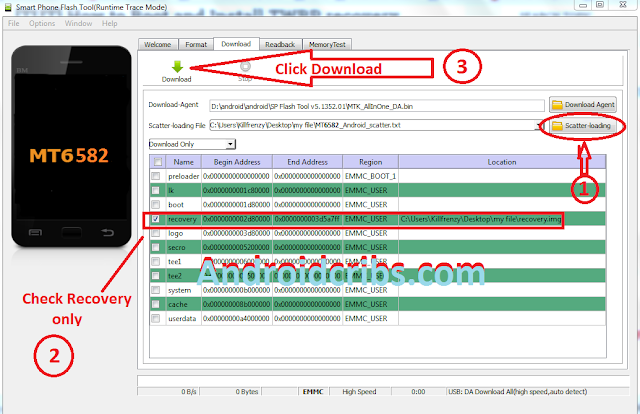
5. Open flash_tool.exe, click on the Download Tab
Tutorial to flash

6. Click Scatter-loading and browse for the scatter file(included in A5000_TWRP_2.8.7.0_LOLLIPOP.zip) (MT6582_Android_scatter)
7. Make sure flashing mode is set to "Download Only" and check mark only on the Recovery.
Tutorial to flash


8. Click Download.
9. Turn off your phone, connect your phone to the PC and wait for the flashing to commence.
10. Green Circle image will show once flashing is completed.
11. Important: Disconnect your phone from the computer, press and hold Vol Up + Power.
12. Boot menu will show, select Recovery.
That's it!

Credits:
SevenMaxs
Yuweng
XDA
Lenovo a5000 group

Lenovo A5000 Kitkat based Rom Collection:

Lenovo A5000 Kitkat based Rom Collection:

Lenovo A5000 Kitkat Rom
Requirements:
Rooted
Custom Recovery
Lenovo A5000 (kitkat)

REMINDER! Please make sure to back your NVRAM folder or IMEI before Flashing this one!
How to backup your imei [CLICKHERE]

Flash it with your own RISK!!!

I am not responsible for any damage or soft/hard brick will happened to your device!


INSTRUCTIONS HOW TO FLASH via CWM/TWRP : 
  
1.Download ROM
2.Copy ROM to SD card
3.Reboot to CWM/TWRP Recovery
4.Select Wipe Data/Factory Reset
5.Select Wipe Cache Partition
6.Select Advance, wipe dalvik cache
7.Select install zip from sd
8. Select the ROM and wait for the installation to finish
9. Reboot
10.Done !! ENJOY!!


How to Root and Flash TWRP or Custom Recovery in Lenovo a5000

How to Root and Flash Custom Recovery in Lenovo a5000
Lenovo a5000

Warning: Rooting can void your warranty!
Requirements:
Lenovo a5000
Kingroot4.1.zip (download and extract)


HOW TO USE KINGROOT
First of all download full APK file of kingroot.
If you use your computer to download the file, then you need to transfer in your device.
now open the APK file with your phone file manager.
before installing this app first ensure that you have allowed third party installations in your device you can check this option by your device setting.
Go To Setting > Security > and there you can tick the “Unknown sources” box.
After successful installation, start the application and wait for Kingroot to fully analyze your device. after a few seconds you will see the main window, Click the Big Green Circle on your device that says Root and wait for a few minutes make sure you have a good internet connection.
After a few minutes, you should see a tick mark in a green circle and the blue horizontal bar below the green circle, which means that your device has been successfully rooted.


How to Flash TWRP via SPFT

Requirements:
PC
USB Cable


Download Links:
Mediatek VCOM Drivers:

SP Flash Tool:


ETA-SuperSU-v2.52.zip:

 Instructions
1. Download all necessary files and Enable USB Debugging mode in your phone..
2. Install Drivers USB_VCOM_Driver.rar
In Device Manager Right click on PC name(Right Side) and then click on Add legacy hardware as shown in image below.

DRIVER SETUP
Now in Add Hardware Wizard click on Next » Install the Hardware that i manually select from a list (Advanced) » Show All Devices » Next » Have a Disk, Now select the any inf file from where you extracted the downloaded VCOM driver package.

SPFT

 Now Click on Next and select Install this driver software anyway and wait for finishing the process.

SPFT SCREENSHOT

    After installation is finished then Restart your computer, That's it.
3. Extract SPFlash tool
    Extract  Lenovo A5000 TWRP.zip and rename into recovery.img
4. Copy the BETA-SuperSU-v2.52.zip to your phone.
5. Open flash_tool.exe, click on the Download Tab
SPFT SCREENSHOT 2

6. Click Scatter-loading and browse for the scatter file(included in Lenovo A5000 TWRP.zip) (MT6582_Android_scatter)
7. Make sure flashing mode is set to "Download Only" and check mark only on the Recovery.
SPFT SCREENSHOT 3


8. Click Download.
9. Turn off your phone, connect your phone to the PC and wait for the flashing to commence.
10. Green Circle image will show once flashing is completed.
11. Important: Disconnect your phone from the computer, press and hold Vol Up + Power.
12. Boot menu will show, select Recovery.


From the custom recovery (TWRP), it is recommended to backup your phone first, before rooting.


To root:
1. Reboot your  phone then press and hold Vol Up + Power On
 the TWRP Recovery , click Install.
2. Select BETA-SuperSU-v2.52.zip.
3. Flash it, no need to wipe cache, you can reboot as it is.
4. Enjoy your rooted Lenovo a5000.

Then download Root checker in Playstore to verified.
SUCCESS ROOTED


Credits:
Lenovo a5000 group
Darwin Rivera for scatter file

How to fix bootloop Lenovo a5000(kitkat) via SPFT

How to fix bootloop Lenovo a5000(kitkat) via SPFT
Lenovo a5000

Requirements:
PC
USB Cable

Download Links:
Mediatek VCOM Drivers:

SP Flash Tool:

Lenovo a5000 Stock rom
Click Here


 Instructions
1. Download all necessary files and Enable USB Debugging mode in your phone..
2. Install Drivers USB_VCOM_Driver.rar
In Device Manager Right click on PC name(Right Side) and then click on Add legacy hardware as shown in image below.

driver setup
Now in Add Hardware Wizard click on Next » Install the Hardware that i manually select from a list (Advanced) » Show All Devices » Next » Have a Disk, Now select the any inf file from where you extracted the downloaded VCOM driver package.

SPFT SETUP

3.  Now Click on Next and select Install this driver software anyway and wait for finishing the process.

SPFT SCREENSHOT 1

4.  After installation is finished then Restart your computer, That's it.
5. Open flash_tool.exe, click on the Download Tab
 Extract the downloaded lenovo a5000 stock rom to the new folder you created.
SPFT SCREENSHOT 2

6. Click Scatter-loading and browse for the scatter file (MT6582_Android_scatter)
7. Make sure flashing mode is set to "Download Only" and check mark all except Preloader.
8. Click Download.
9. Turn off your phone, connect your phone to the PC and wait for the flashing to commence.
10. Green Circle image will show once flashing is completed.
SPFT SUCCESS