|
| Japan adopting tech (NFC) that was originally adopted from Japan (FeliCa) |
In the Japanese
電子マネー (e-cash) world, there are currently six main
FeliCa (a Japan-based near-field communication system) based systems for paying for goods at stores and restaurants with Japanese yen using your Japanese mobile phone's
おサイフケータイ (Osaifu-Keitai "mobile wallet") app:
- #1. iD [credit]
- Affiliated with NTT's docomo, it ties primarily to Visa/MasterCard®, and docomo's DCMX credit service. (with some exceptions depending on the issuing bank). iD is not a smartphone-only technology; it can (and often is) embedded in Japanese credit cards standalone.
 |
| iD's credit-based competitor |
#2. QUICPay [credit]- It ties primarily to JCB and AMEX credit/charge cards (with some exceptions depending on the issuing bank). It is a standalone technology that links existing credit cards to your phone; there are no credit cards that have "QUICPay" NFC chips in them.
- #3. WAON [pre-loaded cash]
- It is affiliated with JAL for miles; preferred payment system for ÆON (イオン) owned businesses.
 |
| logo after Bitwallet K.K. acquisition |
#4. Rakuten Edy [pre-loaded cash]- It's affiliated with ANA for miles, and also Rakuten Super Points, Ponta (Lawson, KFC, …), Edy de COIN (GREE), T-POINT, Yodobashi Gold Points, EPOS Card, Belle Maison Points, Bic Points, NEXCO, Edy de Matsumoto Points, EDION Points; you can also pay with cash in your smartphone's Edy for goods over the internet — via smartphone or personal computer.
- #5. nanaco [pre-loaded cash]
- This is the preferred payment system for 7&i Holdings businesses: 7-Eleven, Denny's, Loft, Itō-Yōkadō supermarkets, Sogō-Seibu department stores, ….
 |
| The penguin sure is cute. |
#6. Mobile Suica [pre-loaded cash]- This is the preferred payment system for JR (stores inside atré malls next to big JR stations) compatible nationwide with train and bus stations on the "IC" transportation network: Suica, PASMO, ICOCA, PiTaPa, TOICA, manaca, nimoca, SUGOCA, Kitaca, etc.
 |
| None of these are directly linked to a credit card |
The first two systems, iD and QUICPay, are basically substitutes for credit card "swiping" as they are linked directly to a credit card — although all of the "pre-loaded cash" systems can be "charged" or "top off-ed" (transferring Japanese yen, or converting loyalty points, from one account into the secure separate storage in the phone) directly via various apps; Rakuten
Edy also allows topping off from either a Rakuten Bank or a Rakuten account, which can be linked to many types of payment systems, including credit cards.
 |
| Rakuten allows direct transfers from its bank account to Edy. |
Not just any credit card can be linked to iD and QUICPay; both have a list of supported bank/card combinations.
None of these systems, however, worked with the two most popular
NFC based payment systems in the North America and Europe:
MasterCard/Maestro's PayPass™ and
Visa's payWave.
Until recently.
Getting PayPass ability for your Japanese phone
The iD system now works with MasterCard's PayPass system. In addition to paying for things with a swipe of your phone in Japan, you can now also do the same overseas. In order to use PayPass, you must meet the following requirements:
A. You need an Android phone that has hybrid FeliCa / NFC hardware.
FeliCa is Sony developed "Japanese NFC" and is much older than the international
NFC system that was inspired by it. Early Japanese phones (smartphone and feature phones) were
FeliCa only; newer (all 2014 models and most 2013 models) Japanese market Android docomo phones with NFC are hybrid
NFC+
FeliCa. Non-Japanese phones are
NFC only.
As of July 2014, the docomo models that support hybrid
FeliCa+
NFC Type A/B are:
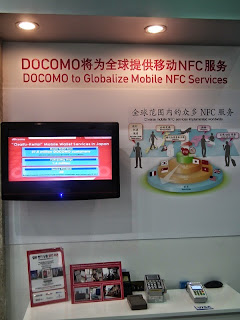 |
| 2012: inside or outside Japan NFC |
- ARROWS NX F-05F
- GALAXY S5 SC-04F
- AQUOS ZETA SH-04F
- Disney Mobile on docomo SH-05F
- Xperia Z2 SO-03F
- Xperia A2 SO-04F
- ARROWS NX F-01F
- Disney Mobile on docomo F-03F
- G2 L-01F
- GALAXY Note 3 SC-01F
- GALAXY J SC-02F
- AQUOS PHONE ZETA SH-01F
- SH-01F DRAGON QUEST
- AQUOS PHONE EX SH-02F
- Xperia Z1 SO-01F
- Xperia Z1 f SO-02F
- ARROWS NX F-06E
- Disney Mobile on docomo F-07E
- Optimus it L-05E
- MEDIAS X N-06E
- ELUGA P P-03E
- AQUOS PHONE ZETA SH-06E
- AQUOS PHONE si SH-07E
- Xperia A SO-04E
- Xperia feat. HATSUNE MIKU SO-04E
- AQUOS PHONE EX SH-04E
- Xperia AX SO-01E
- Optimus G Pro L-04
- EELUGA X P-02E
- AQUOS PHONE ZETA SH-02E
- Xperia Z SO-02E
B. You need a miniUSIM that is compatible with NFC wallets (type A/B).
 |
| Upgrade your early hybrid NFC/FeliCa with this for free. |
The early mini
USIMs for Docomo phones were usually colored in red livery. The new
NFC wallet compatible mini
USIMs are pink.
Any docomo shop will replace your legacy SIM for the new pink SIM free-of-charge, and you will be able to keep your phone number (but not any SIM-based contact lists or applications, which are obsolete in 2014 anyway).
You will know when you have a pink Type A/B mini
USIM in your device because the
おサイフケータイ (Osaifu-Keitai "mobile wallet") app will have an additional third column (accessible by swiping left or right) in the
マイサービス (My Service) &
おすすめ (Recommend) areas:
- すべて | All
- 本体 | Phone(FeliCa)
- UIMカード | UIM card
To find out how many blocks of memory (which is completely separate from your phone's memory or USB memory or SD card storage) your FeliCa apps are using, press your phone's physical/virtual menu button while inside the
おサイフケータイ (Osaifu-Keitai "mobile wallet") app and select
メモリ使用状況 (Status of used memory). The
本体 (FeliCa) / Phone(FeliCa) area will have two areas:
- a 共通領域 (Common Area) that will have around 750 blocks
- a 鉄道・バス領域 (Transportation Area) that will have around 250 blocks.
A nice feature of storing the data on the
USIM card is that you do not need to do the complicated process of
機種変更 (model change [procedure]) for every valuable
FeliCa application that has non-backed up cash or important data (that is only in the handset) when you need to turn in your phone for servicing or repair — or you are upgrading or replacing a mobile device; all you need to do is transfer your
UIM to the new phone. There is no need to put the data in temporary escrow with the app provider or carrier.
C. You need a PayPass compatible Japanese MasterCard.
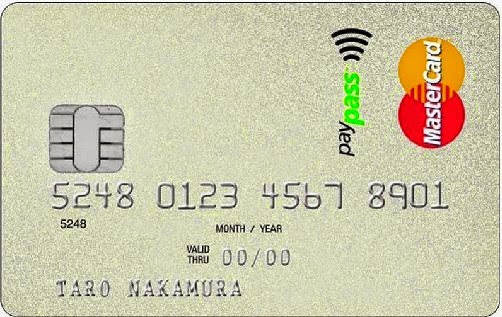 |
| This is a compatible card (and one of the first) |
It's not enough to have a Japanese credit card that is iD compatible; it must be iD (meaning it's issued by a Japanese bank)
and PayPass compatible.
Before you apply for a card, it's best to load the latest app and check the list of support bank/card combinations so you don't get disappointed. If you get a card, you'll probably want one with a contact smart chip in it too, as using a PIN instead of a signature is getting to be pretty standard in Japan and Europe, although it still has a long way to go in America.
D. You need version 8.0 or later of the "iDアプリ".
 |
| PayPass enabled since Feb, 2014 |
The official documentation says you need version 8.0 or later of the iD software, however, the app's Change Log in the Play Store claims that PayPass ability was added in version 7.0. As of July 1, 2014, the current version is 9.0.
There are two ways to get the
iD app: one is straight
through the Google Play Store. Another way is through the
おサイフケータイ (Osaifu-Keitai "mobile wallet") app, which is usually built-in to your Galápagos firmware and will be in the
おすすめ (Recommend) section if it is not already installed. If it
is installed, it will be in the
マイサービス (My Service) Installed
NFC/
FeliCa applications do not appear in the installed apps section of your phone and vice-versa; the
NFC/
FeliCa applications are isolated from the Android system and the two use a bridge to communicate with each other.
Note that both the
おサイフケータイ (Osaifu-Keitai "mobile wallet") app and the iD application are very security sensitive because they deal with money. If you root your phone or replace the firmware, it is unlikely these apps will be able to be downloaded. And even if they are side-loaded, they will refuse to work. The iD app won't even work if Wi-Fi is enabled.
E. Your NFC R/W P2P functionality needs to be "off".
Your PayPass will work even when your phone is off because it is designed to work in "client/slave" mode where the
POS NFC/
FeliCa terminal acts as the "host/master" providing the main power (by induction through the air). Counterintuitively though, when
NFC is "turned on" on your phone, your PayPass/iD will not work.
Fortunately, many phones include widgets and UIs that allow you to "temporarily" activate
P2P NFC, disabling it (and saving battery life) after a preset amount of minutes. This way, you won't accidentally forget and have to fiddle with your phone to deactivate
R/W P2P while there's a line behind you.
 |
| If you can do this, your NFC R/W P2P is "on" and NFC iD/Paypass (among other things) won't work. |
F. You need to apply (email/phone/postal mail) and register with your credit card company
 |
| "Huh? Am I living in the 20th century?!" |
Once you get the card, you will need to register it with the iD app. Unfortunately (or fortunately), for security reasons, this is not as simple as inputting the card number, CVC, and expiration date. You will need to tell your card company that you wish to use the service and they will send you a one-time use activation code etc. via certified mail.
In the application, you may set limits for the use (max amount per transaction, max amount per day), as well as PINs to use for amounts over a certain threshold, PINs for the smart chip, and passwords for using or maintaining the status of the card over the internet. The details will depend on the card.
Using your iD at PayPass & PayWave terminals overseas
![MasterCard paypass または [PayWave]](https://blogger.googleusercontent.com/img/b/R29vZ2xl/AVvXsEj3kwSxZyTACgfQzAjANdUiMDHrv3NqGbNtjXdyplVFCHF4_5ei5HBNV-Heb4IzmcfabVtshDsikqzAubXe2Np1CJFYpAAvcMlFgJ6FxVBCjw9d6pgS2CBFQR7QwU0QG48IxplZm6aJpoa-/s1600/img_paypass_01.gif "Visa and MasterCard are almost always supported together") |
| Notice how this MasterCard ad doesn't label the right logo as "Visa PayWave". |
Even though you can't link your iD to a Visa PayWave card, you can still pretty much pay at any
POS NFC terminal that accepts either MasterCard PayPass or Visa PayWave — just like how you can use MasterCard anywhere Visa is accepted and vice versa.
Protecting your device from theft
 |
Android Device Manager:
don't leave home without it |
With all of the additional security features turned off, your e-money and
NFC based credit cards are about as secure as an old fashioned credit card or cash: if somebody steals or you lose your phone, you have to deal with it the same way you deal with a lost or stolen credit card.
However, depending on your preference between balancing convenience versus security, you can make the
NFC based payments more secure than cash or credit. Depending on your device, you may be able to do one or more of the following:
Using a plain non-mobile credit card
 |
| Non-traditional shape of a NFC credit "card" |
Of course, you can always use a plain credit card with a PayPass chip in it. The PayPass "card" may not even be in the shape of a credit card; while they're not available yet in Japan, paying by PayPass can be done by a keychain, a bracelet, or a watch.
It's nice to know that if you decide to switch from a phone which supports
NFC to one that doesn't, you can continue to use your PayPass with a less high tech device that doesn't run on any power.
Other Options
 |
| ... when I get around to it. |
Many of you in Japan that travel overseas might not have a docomo but might use a phone from another carrier. Even more of you might not have a Japanese PayPass MasterCard.
Are there ways to use your Japanese phone to pay for things outside of Japan.
Yes, there are! I will be covering these methods in future posts.