Facebook recently enabled autoplaying videos on its website and apps and this feature is the most annoying thing in the world.... After Bieber though!
I find it annoying especially because they start playing even when you're just scrolling down and don't pause at the video. It can waste data, and sometimes people will share videos that you would rather just not see, but avoiding them when they start playing in front of you without warning can be difficult.
It's actually possible to disable the autoplay quite easily, though the settings aren't very obvious at first glance. Don't worry though - whether you want to disable autoplaying videos on the Facebook website or Android or iOS apps, I've got you covered.
Follow these steps to stop Facebook videos from automatically loading and playing.
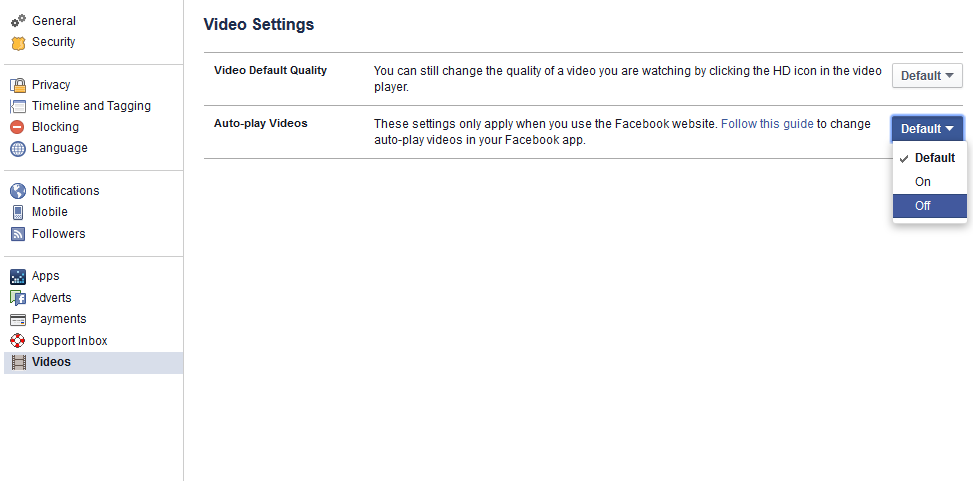
If you are using Facebook on the Web (desktop browser):
1) Go to Facebook's video settings page when you are logged into your Facebook account.
2) Click the button to the right of Auto-play Videos and choose Off from the drop down menu.
2) Click the button to the right of Auto-play Videos and choose Off from the drop down menu.
If you are using the Facebook app for Android, use the following steps to stop Facebook videos from autoplaying:
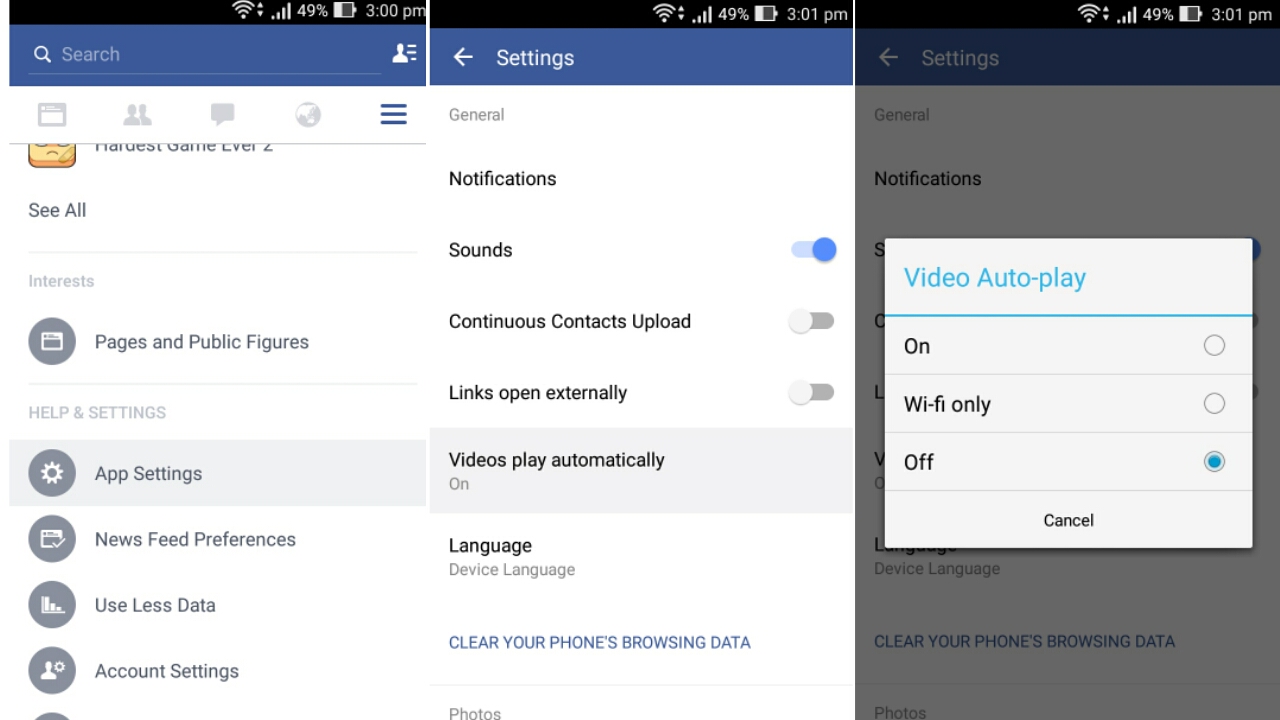
1) Tap the three horizontal lines icon.
2) Scroll down and tap App Settings.
3) Tap Video Auto-play.
4) Tap Off to stop videos from automatically playing, or Wi-fi only if it's okay for videos to autoplay when you are on Wi-Fi.
2) Scroll down and tap App Settings.
3) Tap Video Auto-play.
4) Tap Off to stop videos from automatically playing, or Wi-fi only if it's okay for videos to autoplay when you are on Wi-Fi.
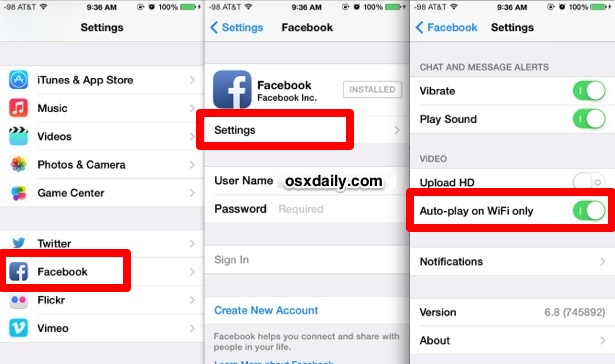
If you are using the Facebook app for iPhone, use the following steps to disable video autoplay:
1) Tap the three horizontal lines icon labelled More near the bottom right corner.
2) Scroll down and tap Settings.
3) Tap Account Settings.
4) Tap Videos and Photos.
5) Tap Auto-play.
6) Tap Never Auto-play Videos to completely stop Facebook videos from automatically playing, or On WiFi Connections Only if you don't mind videos autoplaying when you are on Wi-Fi.
2) Scroll down and tap Settings.
3) Tap Account Settings.
4) Tap Videos and Photos.
5) Tap Auto-play.
6) Tap Never Auto-play Videos to completely stop Facebook videos from automatically playing, or On WiFi Connections Only if you don't mind videos autoplaying when you are on Wi-Fi.
If you are using the Facebook app for iPad, use the following steps to stop videos from automatically playing:
1) Tap the three horizontal lines icon labelled More near the bottom right corner.2) Scroll down and tap Account Settings.
3) Tap Videos and Photos.
4) Tap Auto-play.
5) Tap Never Auto-play Videos to completely stop Facebook videos from automatically playing, or On WiFi Connections Only if you don't mind videos autoplaying when you are on Wi-Fi.
You have one less annoying thing in your life now that Facebook videos autoplay is disabled. For more tutorials, visit the How To section.
Follow Me on Twitter>>> @iamBhavish
And like us on Facebook>>> The Gud1


